isFieldChangedNow()
Available since v2.0.14
The isFieldChangedNow() method checks whether a specific field was modified by the user
during the current frontend interaction (in this iteration only).
public <V> boolean isFieldChangedNow(RowDependentFieldsMeta<T> fields, DtoField<? super T, V> field)
Parameters:
fields– The current metadata state of the fieldsfield– The DTO field to check
Returns(boolean):
trueif the field was changed in the UI during this interactionfalseif it was not changed
✅ Recommended Usage
Use this method only for checking changes in dependent fields.
We recommend placing isFieldChangedNow() at the beginning of buildRowDependentMeta, to ensure all dependent values are updated first, before setting setHidden, setRequired, or other field properties.
How to add?
Example
buildRowDependentMeta
   public void buildRowDependentMeta(RowDependentFieldsMeta<MyExample3420DTO> fields, BcDescription bcDescription,
                                     String id, String parentId) {
       if (fields.isFieldChangedNow(fields, MyExample3420DTO_.country)) {
           if (fields.getCurrentValue(MyExample3420DTO_.country).isEmpty()) {
               fields.setCurrentValue(MyExample3420DTO_.region, null);
               fields.setCurrentValue(MyExample3420DTO_.street, null);
               fields.setCurrentValue(MyExample3420DTO_.customField, null);
           } else if (Objects.equals(fields.getCurrentValue(MyExample3420DTO_.country).orElse(null), CountryEnum.BELARUS)) {
               fields.setCurrentValue(MyExample3420DTO_.region, RegionEnum.MINSK);
               fields.setCurrentValue(MyExample3420DTO_.street, "Avenue Nezavisimosti");
               fields.setCurrentValue(MyExample3420DTO_.customField, "New value for BELARUS");
           } else if (Objects.equals(fields.getCurrentValue(MyExample3420DTO_.country).orElse(null), CountryEnum.RUSSIA)) {
               fields.setCurrentValue(MyExample3420DTO_.region, RegionEnum.MOSCOWSKAYA);
               fields.setCurrentValue(MyExample3420DTO_.street, "Tverskaya street");
               fields.setCurrentValue(MyExample3420DTO_.customField, "New value for RUSSIA");
           }
       }

       if (fields.isFieldChangedNow(fields, MyExample3420DTO_.region)) {
           if ((Objects.equals(fields.getCurrentValue(MyExample3420DTO_.region).orElse(null), RegionEnum.MINSK))) {
               fields.setCurrentValue(MyExample3420DTO_.street, "Avenue Nezavisimosti");
               fields.setCurrentValue(MyExample3420DTO_.customField, "New value Minsk");
           } else if ((Objects.equals(fields.getCurrentValue(MyExample3420DTO_.region).orElse(null), RegionEnum.GOMEL))) {
               fields.setCurrentValue(MyExample3420DTO_.street, "Avenue Nezavisimosti Gomel");
               fields.setCurrentValue(MyExample3420DTO_.customField, "New value Gomel");
           } else if ((Objects.equals(fields.getCurrentValue(MyExample3420DTO_.region).orElse(null), RegionEnum.MOSCOWSKAYA))) {
               fields.setCurrentValue(MyExample3420DTO_.street, "Tverskaya street");
               fields.setCurrentValue(MyExample3420DTO_.customField, "New value");
           } else {
               fields.setCurrentValue(MyExample3420DTO_.street, null);
               fields.setCurrentValue(MyExample3420DTO_.customField, null);
           }
       }

       if (fields.isFieldChangedNow(fields, MyExample3420DTO_.street)) {
           fields.setCurrentValue(MyExample3420DTO_.customField, "New value");
       }

       if (fields.isFieldChangedNow(fields, MyExample3420DTO_.customFieldDouble)) {
           fields.setCurrentValue(MyExample3420DTO_.customField, "");
       }
       if (fields.isFieldChangedNow(fields, MyExample3420DTO_.street)) {
           fields.setCurrentValue(MyExample3420DTO_.customField, "test");
       }

       fields.setEnabled(MyExample3420DTO_.street);
       fields.setEnabled(MyExample3420DTO_.money);
       fields.setEnabled(MyExample3420DTO_.descriptionProduct);
       fields.setEnabled(MyExample3420DTO_.product);
       fields.setEnabled(MyExample3420DTO_.country);
       fields.setEnabled(MyExample3420DTO_.region);
       fields.setEnabled(MyExample3420DTO_.customField);
       fields.setEnabled(MyExample3420DTO_.customFieldNew);
       fields.setEnabled(MyExample3420DTO_.customFieldDouble);
       fields.setEnabled(MyExample3420DTO_.customFieldDateTime);
       fields.setPlaceholder(MyExample3420DTO_.customFieldDateTime, "Less sysdate");
       fields.setEnumValues(MyExample3420DTO_.country, CountryEnum.values());
       fields.setEnumValues(MyExample3420DTO_.region, RegionEnum.values());

       if (Objects.equals(fields.getCurrentValue(MyExample3420DTO_.country).orElse(null), CountryEnum.BELARUS)) {
           fields.setEnumValues(MyExample3420DTO_.region, RegionEnum.BREST, RegionEnum.GOMEL, RegionEnum.MINSK);
       } else if (Objects.equals(fields.getCurrentValue(MyExample3420DTO_.country).orElse(null), CountryEnum.RUSSIA)) {
           fields.setEnumValues(MyExample3420DTO_.region, RegionEnum.KOSTROMSKAYA, RegionEnum.MOSCOWSKAYA, RegionEnum.VOLGOGRADSKAYA);
       }

   }
How it works?
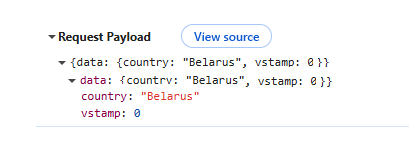
On the frontend side, a new tag changedNow_ was introduced.
This tag stores only the fields modified in the current user session, before being sent to the backend.
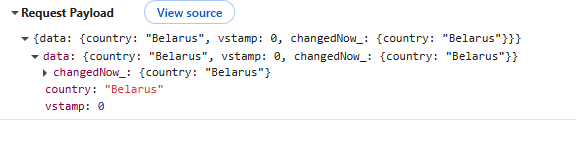
When is changedNow_ sent?
row-meta/ (POST)
- When the user exits a field that has
forceActive = true. - When call FormPopup widget
| Scenario | Meta Builder Called | Field Update Triggered |
|---|---|---|
Editing a field with forceActive |
✅ Yes | ✅ Yes |
forceActive → Standard Save button (for fields listed below where row-meta is not triggered until the field is exited) |
❌ No | ❌ No |
forceActive → Custom button (for fields listed below where row-meta is not triggered until the field is exited) |
❌ No | ❌ No |
Opening a FormPopup |
✅ Yes | ✅ Yes |
| Clicking only the Standard Save button | ❌ No | ❌ No |
| Clicking only a Custom button | ❌ No | ❌ No |
| Clicking Delete | ❌ No | ❌ No (only deletes the record) |
| Scenario | Meta Builder Called | Field Update Triggered |
|---|---|---|
Editing a field with forceActive |
✅ Yes | ✅ Yes |
forceActive → Standard Save button (for fields listed below where row-meta is not triggered until the field is exited) |
✅ Yes (via /row-meta → followed by save request) |
Update occurs within the /row-meta event |
forceActive → Custom button (for fields listed below where row-meta is not triggered until the field is exited) |
✅ Yes (via /row-meta → followed by custom action) |
Update occurs within the /row-meta event |
Opening a FormPopup |
✅ Yes | ✅ Yes |
| Clicking only the Standard Save button | ❌ No | ❌ No |
| Clicking only a Custom button | ❌ No | ❌ No |
| Clicking Delete | ❌ No | ❌ No (only deletes the record) |
Field Type Behavior
Legend:
- ✅ —
forceActive(row-meta) is triggered immediately on value selection. - ❌ —
row-metais not triggered until a button is clicked or user leaves the field. noValid— field does not support in-place value changes.
| Field Type | forceActive triggered immediately? |
Notes |
|---|---|---|
input |
❌ No | Triggered on click outside the field or on a button |
date |
✅ Yes | |
dateTime |
✅ Yes | |
dateTimeWithSeconds |
✅ Yes | |
number |
❌ No | Triggered on click outside the field or on a button |
percent |
❌ No | Triggered on click outside the field or on a button |
hidden |
noValid |
Not editable |
text |
❌ No | Triggered on click outside the field or on a button |
radio |
✅ Yes | |
checkbox |
✅ Yes | |
money |
❌ No | |
dictionary |
✅ Yes | |
fileUpload |
✅ Yes | |
pickList |
✅ Yes | |
inlinePickList |
✅ Yes | Save only triggered if an item is picked |
hint |
noValid |
Not editable |
multifield |
✅ Yes | |
multivalueHover |
noValid |
Not editable |
multivalue |
✅ Yes | |
multipleSelect |
✅ Yes | |
suggestionPickList |
✅ Yes | Save only triggered if an item is picked |
isFieldChanged() vs isFieldChangedNow()
Unlike isFieldChanged(), which checks whether a field has changed at any point in the past (e.g., using the accumulated data tag), isFieldChangedNow() looks specifically at the current interaction, based on the changedNowParam tag.
This distinction is important when using forceActive or working with dependent fields:
isFieldChanged()may detect earlier changes from previous interactions.isFieldChangedNow()detects only immediate user input from the ongoing client-side session.